
Put Your Face in an Easter Scene — Instantly
Upload any portrait and the tool places that face seamlessly into Easter-themed templates — think giant egg costumes, bunny suits, and spring basket scenes — so you get a shareable holiday photo without touching a photo editor.
Try it now — it's free
Swap Your Face into Easter Templates
Upload a clear photo of a face and choose an Easter scene — the AI handles the blending and returns your finished holiday image.
Drop a face photo here
or click to choose
Drop a target photo here
or click to choose
How to Create Your Easter Face in Hole Photo
Three steps from portrait to finished Easter image.
Upload Your Face Photo
Select a well-lit portrait where the face is clearly visible and unobstructed. The tool reads the facial landmarks from this image, so a front-facing shot with no heavy shadows gives the cleanest result.
Choose an Easter Template
Pick from the available Easter-themed target scenes — bunny costumes, decorated egg cutouts, spring basket settings, and more. Each template has a pre-cut face hole sized and angled for natural placement.
Generate and Download
Tap the swap button and the AI blends your face into the chosen scene, matching skin tone and lighting. Once the result appears, download the finished image to share on social media or send as a holiday greeting.
Easter Face Swap Ideas to Try

Giant Easter Egg Costume

Easter Bunny Suit

Spring Basket Scene

Easter Chick Costume
Easter Scene Styles for Every Mood
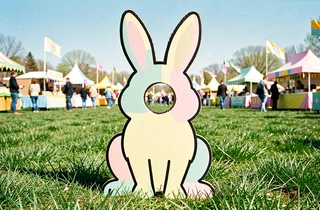
Classic Cartoon Cutout
A bold illustrated Easter character with a pre-cut face hole — ideal when you want a retro photo-booth feel that reads as obviously playful rather than realistic.
Photorealistic Costume Blend
The face is composited into a photographic Easter costume image with matched lighting and skin-tone adjustment, producing a result that looks like an actual dressed-up photo rather than a cutout.

Animated Sticker Style
A flat, graphic Easter scene rendered in a modern sticker aesthetic — great for messaging apps and social stories where a bold, simplified look stands out on small screens.

Vintage Easter Postcard
The face is placed into a sepia-toned or muted-pastel Easter scene styled after early twentieth-century holiday postcards — a distinctive look for greeting cards or printed keepsakes.

Common Questions About Easter Face in Hole
What kind of photo works best as the source face image?
A front-facing portrait with even lighting and no large obstructions — sunglasses, heavy shadows, or extreme angles — gives the most accurate placement. The face should occupy a reasonable portion of the frame rather than appearing very small in a wide shot.
Can I use a photo of a child or a group photo as the source?
Yes. Any clear portrait works as the source, including photos of children. For group photos, the tool reads the most prominent face in the frame, so crop to a single face before uploading if you want to control which person is swapped.
Do I need to create an account or install anything?
No account or installation is required. The tool runs entirely in the browser, so you upload your photo, pick a template, and download the result without signing up or adding any software.
How realistic will the final Easter face swap look?
Results depend on the source photo quality and the template style. Photorealistic costume templates produce a more convincing blend, while illustrated cutout templates are intentionally stylized. A well-lit, front-facing portrait consistently produces the cleanest output across all template types.
Can I use the finished image on social media or in a greeting card?
Downloaded images are yours to share on social platforms, send in messages, or print as greeting cards. Check the site's terms of service for any commercial use restrictions before using the output in paid promotional material.
What happens to my uploaded photo after the swap is generated?
The tool processes your image to generate the swap result. For specific details about data retention or storage, refer to the site's privacy policy — this page does not make independent claims about how uploaded files are handled.