
Fotor AI Face Swap reviewed: quality, credits, and whether it earns the upgrade
Short answer: Fotor's face swap is fine for casual social edits, weak for accurate likeness work, and opaque on real cost per swap. The free plan stamps AI output with a watermark, the Pro plan gives you 100 credits per month for $3.99 billed annually, and Pro+ triples that allowance for $7.49 a month. Documented bias against darker skin tones and limited output control push it into the "secondary feature" category. Anyone who needs a dependable face replacement tool will get better results from Reface or DeepSwap.
This review isolates the face swap feature specifically, because most Fotor write-ups fold it into a general photo editor overview and skip the parts that actually matter: credit consumption, racial accuracy, and whether the free tier is even usable. All prices, ratings, and policy details below were verified at publication time from the sources cited.
What is Fotor's face swap feature and how does it work
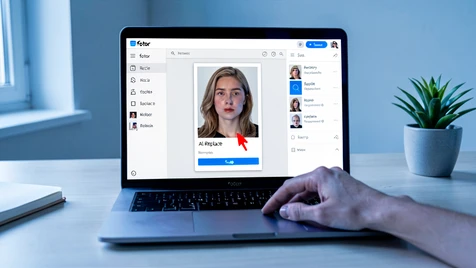
Inside Fotor, the tool you want is labeled AI Face Swap in some menus and AI Replace in others. They point at the same underlying model: you mark a region of a photo containing a face or object, and the AI substitutes it with a generated replacement. According to shibleysmiles, the reviewer who first flagged the control problem, getting the AI to land on the exact replacement you pictured takes patience, and even then the output drifts.
Fotor runs everywhere its users already are. You can open the AI Replace feature in a browser, the Windows desktop app, the Mac desktop app, the iOS app, or the Android app. No separate face-swap install is needed. Cross-device continuity is one of the genuine strengths here.
The basic workflow looks like this.
- Open Fotor on web or mobile and choose AI Face Swap or AI Replace from the AI tools menu.
- Upload your source photo, which is the image whose face will be changed.
- Select the face area by brush or automatic region detection.
- Optionally upload or choose the target face you want placed into the scene.
- Run the AI. Wait a few seconds. Review the output and re-run or refine if the result drifts.
A few things are missing from that flow compared with dedicated apps. There is no fine-grained slider for how much of the target face's identity should transfer. There is no separate mouth or eye lock. The reviewer at shibleysmiles described difficulty controlling exact replacement output, and in practice that means you run the swap, inspect, and re-run until something passes. Budget extra credits for the iteration on top of the final render.
Output quality: how realistic are the swaps, really
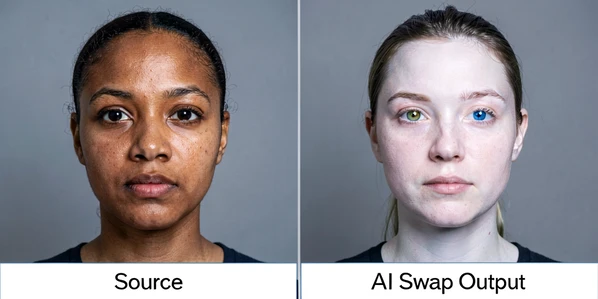
This is where the review gets uncomfortable. Output quality on Fotor face swap is inconsistent, and the inconsistency is not random. It skews against specific users. A verbatim App Store review, cited here in full because the detail matters, captured the pattern: "I have noticed that in most cases, people of color whether Black or Asian they all turn into white people with blue or green eyes." That reviewer also reported gender changes in the output. These are not edge-case failures. They are the feature working as trained on a skewed dataset.
We take such feedback seriously and are committed to ensuring our app respects and accurately represents all users.
That response is from the Fotor developer, posted publicly on the App Store listing in reply to the bias complaint. It is useful because it is an official acknowledgment, but it is not a fix. Until the model is retrained and the outcome measurably changes, the behavior stands. If you are editing diverse subjects, test before you subscribe.
Why does this happen mechanically. Two failure modes matter. First, the landmark detector built into face replacement tools locates eyes, nose, and mouth to align a target onto the source. If the training set underrepresents a given skin tone or eye shape, detection lands slightly off, and the blending stage pulls features toward whatever it saw most often during training. Second, the generative blend that fills the swapped region uses the target face as a prior but hallucinates texture for skin, lashes, and irises, and hallucinations default to the majority distribution. Both steps compound. The result is a face that technically sits in the right place but resembles someone from a different demographic.
The closely related AI Headshot Generator shares the same weakness. App Store reviewers repeatedly describe the headshot output as looking nothing like the subject, despite paying an extra fee for it. If headshots miss, expect face swap to miss on the same axis.
If you plan to evaluate Fotor, run this short test. Pick three source photos: one light-skinned subject, one Black or brown-skinned subject, one East Asian subject. Swap each into the same target scene. Save the before-and-after pairs. If eye color shifts, skin tone lightens, or features round into a different ethnic profile, you already have your answer without spending another credit.
How many credits does a face swap cost, and why the answer is slippery
Fotor runs its AI tools on a credit system. You subscribe to a plan, the plan grants you a monthly credit pool, and each AI operation draws from that pool. According to shibleysmiles, Pro users get 100 credits per month, and Pro+ users get 300. The part Fotor does not publish anywhere obvious is how many of those credits a single face swap burns.
That opacity matters more than it sounds. If a swap costs one credit, the 100-credit Pro pool is overkill for occasional users and tolerable for frequent ones. If it costs five or ten, you will hit the ceiling within a week of testing, right when you are still learning which prompts and source photos actually work. Multiple App Store reviews describe credits depleting fast enough to block evaluation during the free trial, which is exactly when you need room to experiment. Log your balance before and after a swap and you will have a firmer number than anything the marketing pages disclose.
Layered on top: Fotor's AI Headshot Generator is not included in the subscription credit pool. It requires a separate one-off payment, starting at $9.99 for the smallest pack, according to the App Store listing. The developer explains this by citing high compute cost and offers premium members a 50% discount. The pattern matters for face swap buyers because it signals Fotor's willingness to break features out of the subscription after the fact. A regular face swap user should watch for similar carve-outs over time.
Pro tip: if you are on the 7-day trial, spend your first two days running swaps in batches and logging the credit deduction per run. Budget your remaining days around that observed rate instead of the hypothetical 100.
Free plan users face a different wall. Fotor's free tier, documented by Sonary, stamps a watermark onto AI-generated content. You can try face swap, but the output is branded. That makes the free plan a demo, not a workable tier for publishable results.
Fotor face swap pricing: free vs Pro vs Pro+
Here is what each plan actually buys you if your main interest is face swap. Numbers below come from shibleysmiles and from Fotor's own listings.
| Plan | Price | Monthly credits | Watermark | Commercial license |
|---|---|---|---|---|
| Basic (Free) | $0 | Limited AI access | Yes, on AI output | No |
| Pro | $3.99/mo billed annually ($47.88/yr) or $8.99/mo | 100 | No | No |
| Pro+ | $7.49/mo billed annually ($89.88/yr) or $19.99/mo | 300 | No | Yes |
The free plan is where most people first try the tool. Treat it as a test drive, nothing more. You get limited AI features, a watermark, limited export options, and no cloud storage to speak of. If you are evaluating whether face swap output quality meets your bar, the watermark alone makes real-world judgment almost impossible.
Pro is the sweet spot for most casual users. At $3.99 a month on the annual plan, you unlock 100 credits per month, lose the watermark, and get access to the full AI feature set except batch editing and brand kits. Commercial usage is not included. That last point matters. If you plan to sell edits or use outputs in paid client work, Pro is not the plan.
Pro+ is the commercial tier. Three hundred monthly credits, 10 GB of cloud storage, every feature, and the commercial usage license. At $7.49 a month annually it roughly doubles the Pro outlay. Worth it only if your use case genuinely needs the commercial rights or the bigger credit pool, because the face swap feature itself does not get any smarter on Pro+. It is still the same model, with the same bias and the same output drift.
Both paid tiers include a 7-day free trial, after which Fotor starts billing automatically. Two details from App Store reviews are worth pinning to the fridge before you hand over a card. Recurring payment kicks in the moment the trial ends. And cancellation is desktop-only. You cannot cancel a Fotor subscription inside the mobile app. If you signed up on your phone and assumed the same interface would let you leave, you will be opening a laptop during your cancellation window. Set a calendar reminder two days before the trial ends.
Fotor face swap vs dedicated tools: when each one wins
The real question is not whether Fotor face swap is good. It is whether a generalist editor's face swap can replace a specialist's. The honest answer is conditional.
Fotor is a broad AI photo editor with face swap, AI Skin Retouch, AI Background Remover, AI Magic Remove, and an AI Image Generator bundled together. If you already use Fotor for background removal or skin retouching on portraits, adding face swap to the same workflow is convenient. One login. One subscription. One interface.
Dedicated tools approach the problem differently. Reface is built around face swap, and that focus shows up in likeness preservation. DeepSwap extends the same focus to video, where Fotor does not compete. FaceApp orbits the fun, social-media side of face transformation with a mobile-first interface and no credit system to track.
Pick the tool by the bottleneck you actually feel. A short guide.
- Reface wins when accurate likeness is the job and you need finer control over the swap than Fotor exposes.
- DeepSwap is the pick for video face swap, because Fotor's AI Replace targets still images and does not cover motion.
- Fotor wins when face swap is one occasional task inside a broader editing routine that also uses background removal and retouching.
- FaceApp fits users who want playful transformations on a phone without learning a credit economy.
Fotor is the wrong tool for high-accuracy professional client work, for video, or for editing diverse subjects without a plan to manually correct the output. Those constraints are hard limits, not preferences.
Verdict: is Fotor face swap worth it
Fotor's face swap is acceptable for low-stakes, casual use and unreliable for anything that demands accurate likeness preservation. Output control is thin, the racial bias failure mode is documented and publicly acknowledged by the developer, and the credit cost per swap is not disclosed in any material we could verify. Those three facts together make it hard to recommend as a primary face swap tool.
On pricing, Pro at $3.99 a month billed annually is fair value if you want face swap alongside background removal, object removal, and retouching. Pro+ is only worth it for commercial licensing or if 100 credits a month will not stretch. The free tier is effectively a demo because of the watermark, so skip it for real work.
About those ratings you may have seen. Fotor carries a 4.7 out of 5 on the Apple App Store across roughly 42,000 ratings, a 4.2 on G2, and a 4.6 on Capterra, according to the respective listings. Those numbers reflect satisfaction with Fotor as an overall AI photo editor. They do not isolate face swap quality. Readers who come to Fotor specifically for face replacement should not read those aggregate scores as an endorsement of this one feature.
A tiered recommendation to close.
- Casual social media user, already in Fotor's ecosystem: Pro is worth the $3.99 monthly annual rate, and face swap becomes a pleasant bonus.
- User of color, or anyone editing diverse subjects: run the bias test on the free trial first, and do not subscribe if the output shifts ethnicity or eye color.
- Anyone doing paid client work with face swap: skip Fotor and choose Reface for stills or DeepSwap for video.
- Anyone who thinks they might cancel: sign up on desktop, not mobile, and diary the 7-day trial end date before you even upload a photo.
Use Fotor face swap as a secondary feature within a broader editing workflow. Do not make it the reason you pay.